Well you've come to the right place.
Our goal here at HPR is to make it as easy as possible for you to get your show released.
We take care of the hard bits so you don't need to.
Recording your first show can be a daunting prospect but hundreds of people
like yourself have done it, and so can you.
Don't worry that we won't like the topic, just have a look at our Archive
to see how diverse the contributions have been.
Don't worry if your audio isn't perfect,
that your voice sounds funny,
that English isn't your native language,
that you suffer from a speech impediment,
that your show has loads of ummms and awws in it, etc.
We have plenty of hosts that fall into all these categories, but continue to produce great shows.
At the end of the day the show is about the content and less about perfection.
That's not to say we won't help you with ways to improve the audio if you wish,
or narrate your script for you if you can't or won't record it yourself.
This is some important information that you will need to know before uploading to HPR.
You will no longer be allowed to edit HPR pages on Wikipedia.
Once you upload a show, you will be associated with the HPR project.
As such, Wikipedia policies will prevent you from creating,
or editing pages relating to
Hacker Public Radio. For more information see (Re)Creating a HPR page on wikipedia.
We do not syndicate shows not produced for HPR.
HPR is founded on the principle of Hackers sharing knowledge, so we are not a media aggregation site.
For this reason we are only releasing material created exclusively for HPR.
Once released, the creative commons license will allow sharing it to other locations.
We will continue to promote new podcasts, and other creative commons material,
through our sister site Free Culture Podcasts.
We do allow promotion of one example episode of creative commons content.
You post it as a regular show in the series Podcast recommendations,
with your introduction as to what the piece is, why it's important,
what version of Creative Commons it is released under, and provide links to the website, and to the RSS feed.
You are agreeing to license your show CC BY-SA 4.0.
All our shows are now released under a
Creative Commons Attribution-ShareAlike 4.0 International (CC BY-SA 4.0)
license, which means that while you continue to retain the copyright to your show,
you are allowing us (and everyone else) to use it provided we give you attribution and that we release it under the same license.
You have permission to redistribute your show in its entirety.
Never include content, for example music, in your show that you do not have permission to redistribute.
Try to avoid using any content in your show that can not be redistributed under a
Creative Commons Attribution-ShareAlike 4.0 International (CC BY-SA 4.0)
license.
If you are redistributing under another Creative Commons license, GNU Free Documentation License, public domain,
or FLOSS software license, then please signal that when you upload your show.
We do not post other copyrighted content, even if it is made available under fair use, or by arranged permission.
The audio of your show will not be moderated.
We do not vet, edit, moderate or in any way censor any of the audio you submit, we expect you to do that.
Aside from checking snippets for audio quality/spam checking,
we have a policy that we don't listen to the shows before they are aired.
This is a long standing tradition arising from the fact that HPR is a community of peers
who believe that any host has as much right to submit shows as any other.
Please note that this only relates to the audio you upload.
We do transform the audio into different formats.
The rest of the meta-data (branding/summaries/tags/show notes/etc.), are managed by the HPR Community,
and probably will be edited.
There is no guarantee that we will accept your show.
Even after it is processed, any material that is reported as harming HPR may be unlisted until such a time as the situation can be resolved.
You can expect your show to be rejected for (incomplete list):
- Inaudible audio
- Containing Copyright Content, even Fair Use
- Not a HPR Episode
- Content Containing Harassment, Trolling, Spamming, etc
Please refer to Free speech and general conduct
which describes the agreed approach to this topic.
Your show will be signaled as containing explicit content.
Given that we are an open forum for free speech,
we signal all our shows as "explicit" with the assumption that the listeners will apply the required discretion when playing the shows in public.
That said the majority of our content is technical in nature and therefore is often considered appropriate for any audience.
If you feel that your show will be considered inoffensive in every region of the world
then you can signal your show as Clean when you upload the show.
When dealing with content that is "explicit" or contains material that would best be suited for a mature audience,
it has become traditional to include a short warning at the very beginning of the show before the intro,
to allow listeners sufficient time to switch off the episode should they so desire.
Please refer to Free speech and general conduct
which describes the agreed approach to this topic.
You determine when your show will be scheduled.
You decide when your show should be released.
You can pick a day, or put it in the reserve pool so that the Janitors can use it when there are gaps in the schedule.
Your audio must be ready before you pick a slot.
Any host can select any free slot a up to year in advance,
but the audio must be ready at time of picking a slot.
In exceptional circumstances it may be necessary to reserve a slot while not having the audio available.
This must be approved by the HPR Mailing List in advance.
Be sure to allow as much time as possible,
and include a reason why you feel it is necessary to reserve the slot.
This is intended only for exceptional circumstances,
such as a scheduled interview where we would like the audio to be released as soon after the event as possible,
or to cover an important topical situation that has occurred.
Due to the extended time now needed to post shows to external sites,
the extra work this entails and the disruptive effect of reservations,
we will no longer be allowing them except in very rare cases of the type mentioned above.
The following are standing reservations:
- Anniversary episodes.
- HPR Community News on the first Monday of the month.
- The first day of the fourth month.
Leave two weeks between your shows.
All hosts must leave at least 9 slots (approximately two weeks) between their shows.
This is to avoid a given host, or topic taking over the queue.
We will not move shows once they are scheduled.
Once a show has been posted it is not possible to move them
to another slot.
Your email will be made public.
The mail is just a way for us to get back to you if there was an issue posting the show.
This email address will be published on the HPR website and will be given out in the feeds,
so please use a public email address for this purpose.
Where we publish it we pad it with dot nospam at-sign nospam dot.
For example hpr@example.com becomes hpr.nospam@nospam.example.com.
If you do not want to have your email exposed, please contact the admin@hpr team to arrange a alias.
If you trust the janitors to know your real email,
then we can just use an alias for you on the web site.
Any inbound mail to that alias will be automatically forwarded to your personal email.
That runs the risk that were the redirect list compromised then your real email would get exposed.
We would do our best to protect your email but we can't guarantee anything.
The other option is to use an a throwaway email, like
https://www.guerrillamail.com/
for your show. This will be up for enough time to get the key necessary for to post the show.
However keep in mind that we will be very suspicious of any submission done this way
and will be checking it in detail,
so expect delays in processing.
You IP Address and User Agent will logged.
The information we log is sent at the end of the emails we send to you.
Your IP address is linked to your show until it is posted.
Once we verify the show is a genuine contribution we remove the reference.
We use UTF-8 end to end.
See the video "Characters, Symbols and the Unicode Miracle - Computerphile"
for an interesting background to ASCII and UTF-8.
Keep accessibility in mind.
When you include output from the command line in the show notes,
posting screen-shots of console or terminal output
makes it impossible for screen readers to access the text.
Always try to include the raw output ( eg: embedded in <pre> tags)
Include descriptive language in any link texts.
Avoid structures like: "For accessibility information
click here".
Rather use: "For more information click our
accessibility page"
When adding Images, add the descriptive text under the image (not in the alt tag).
That way everyone can benefit from the description.
Your show will be heard by an International Audience.
We have people listening from all over the world, who may not have the same cultural background as yourself,
therefore you should be as clear as possible when giving details.
For example always give temperatures in both Celsius and Fahrenheit, measurements in Metric and Imperial,
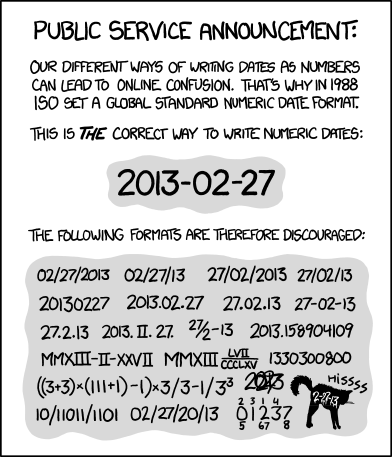
dates in YYYY-MM-DD iso8601 format,
and abbreviations using the NATO phonetic alphabet.
Never assume that your audience knows what age a sixth grader is, or how big a 20 Cent Euro coin is.
Keep in mind that keyboard layouts are also different so make sure to specify the key shape or the position
inrelation to a common known standard.
For example:
The at sign normally situated above the 2 key on a US keyboard, and has a unicode number of U+0040.
For more information see Wikipedia
If you have any questions please join one of our contact channels to chat with people who will help.
The first thing you will need to do is decide on a topic for your show.
We recommend that your first show be a introductory episode to the
How I got into tech series.
First tell us your name,
how you found out about HPR,
and the begin with your earliest introduction to tech.
Cover all the systems you used,
and mention all the people
and events who had a role in shaping your journey.
We will make sure you get lots of suggestions for your next submission in the comments for your show,
and in the next HPR Community News monthly overview.
You can see in our
Complete Episode Overview page
that we a wide variety of topics, ranging from "OMG I just learned/broke/hacked/discovered/etc, this cool thing and no one in my house gets it",
to in depth series where a particular topic can be explored in more detail.
To find a overview of the topics you can also search by keyword on our
tags page.
We maintain a page of requested topics
that have been sent in by the community.
Feel free to add it to the list via the contact channels.
If you are worried that your show may not be of interest to Hackers then you can click here to check if it is.
On this page you will find information on how to record a podcast.
Recording Tips.
Lossless FLAC Level 8 (best) 44100 Hz, 24 bit depth.
FLAC is best, we accept the rest.
Our recommended setting for recording is 44100 Hz, 24 bit depth, saved as Lossless FLAC Level 8 (best).
It makes our life a lot easier if you record with the best quality you can.
Record using the best equipment you have close to hand, try and set the recording to the best quality lossless format like
FLAC, or WAV,
and set everything else to the highest setting.
If your recording setup can't do that, then pick a lossless format, with the highest sample rate you can.
Any audio is better than no audio.
It's always the goal to get the best quality audio,
but here at Hacker Public Radio we value content over quality and so long as it's audible we'll take it.
The show hpr2627 :: Home Phone Setup!! is a perfect example of this.
Procrastination is the enemy.
If it's taking too long to edit the episode then you are less likely to submit the show.
Send this show in, and employ your lessons learned in the next one.
A rule of thumb is to never spend more time editing than recording.
Introduce yourself in each show.
Don't forget to introduce yourself in your show.
We have hundreds of hosts and thousands of episodes.
While you may have done many shows, some people listen randomly,
so this may be the first time they hear your voice.
Avoid Bedding/background music.
You may include backing music but it's best if you don't.
Most long time podcast listeners speed up their shows,
as this allows them to cram more shows into a day.
Having bedding music makes it more difficult to understand,
and prevents tools like truncate silence from working correctly.
Others will convert shows to mono to listen in one ear leaving the other free to carry out their other chores.
Still more slow the shows down so that they can improve their English.
Others are hard of hearing and backing music makes it difficult to understand the text.
We mix down to Mono.
We will by default mix down your show to one channel mono and we will
transcode to opus, mp3, ogg and spx formats.
If you want to control this in more detail then please email admin at Hacker Public Radio for more information.
No need to add Metadata to the file.
There is no need to add any information to the file as that will be inserted based on the information you provide when you upload the show.
Do not add any Theme to the show.
The HPR Intro, and the Outro will be added automatically.
While we did ask people to add it in the past, this is no longer the case.
Recording.
Recording with a Smartphone.
Some of our hosts recommend Audio Recorder by Dmytro Ponomarenko on Android.
It's available on F-Droid
and Google Play.
These are the recommended settings:
- Recording Format: Wav
- Sample Rate: 44.1 kHz
- Audio Channels - Mono
On iphone you can use Apples Voice Memos built in app.
- Recording Mode: Mono
- Audio Quality: Lossless
Recording/Editing using your Computer.
The majority of podcasters use Audacity.
First set the Project Rate to 44100Hz, then you can either record your show in Audacity itself or
import the file you recorded earlier and edit it as you wish.
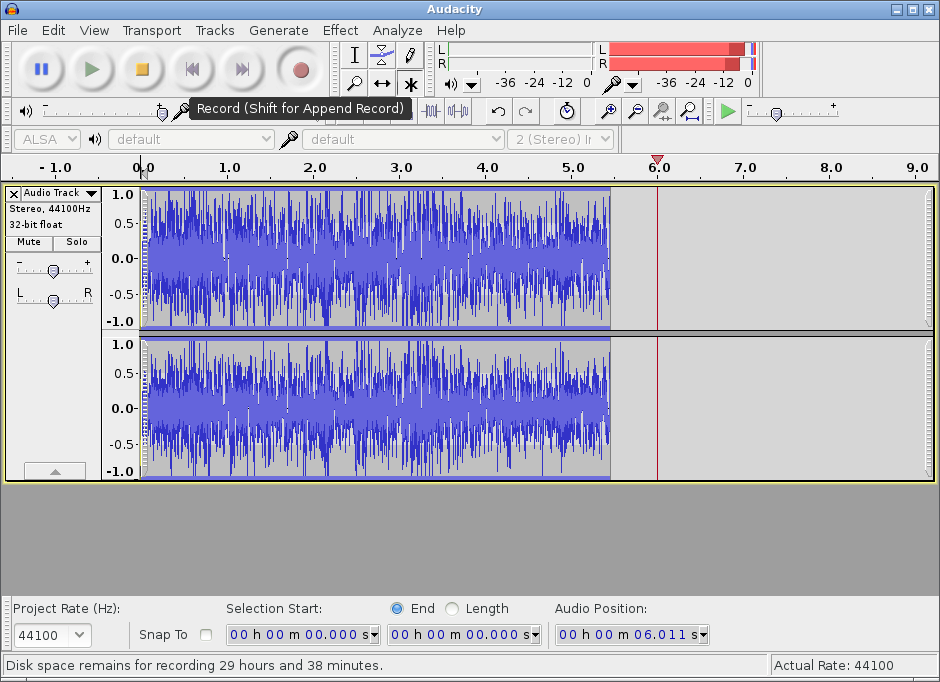
Audacity is a free, easy-to-use and multilingual audio editor and recorder for
Windows, Mac OS X, GNU/Linux and other operating systems.
Video of hpr1404 Ken Fallon Editing prerecorded audio in Audacity
When you have finished editing your podcast you can export it.
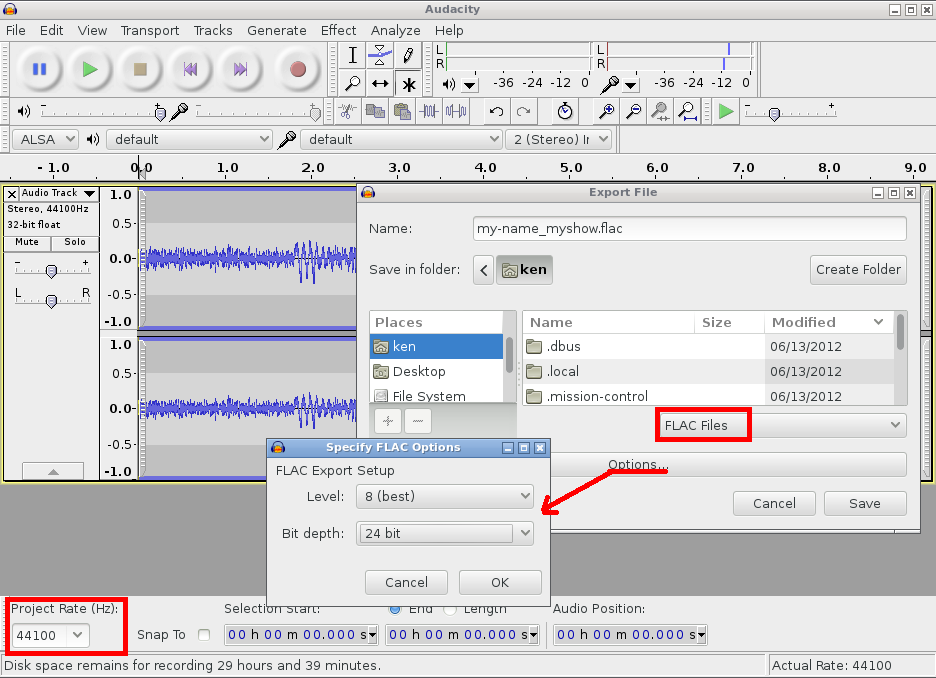
- Confirm that the Project Rate is set to 44100 Hz (bottom left).
- File -> Export and select FLAC File.
- Click Options... to reveal FLAC Export Setup.
- Set Level to 8 (best).
- Set Bit depth to 24.
Recording round table discussions.
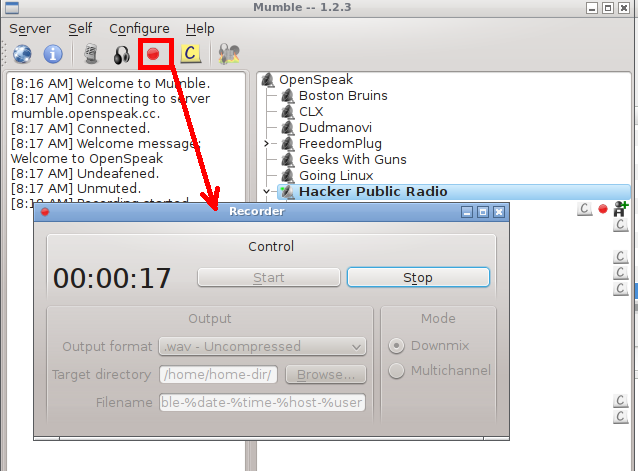
If you would like to record with multiple participants then you can use Mumble.
Connect to chatter.skyehaven.net Port: 64738 .
Walk through the audio wizard and then pop into the Hacker Public Radio room.
Once you are ready press the recording button, select multichannel and then start.
That will record a single track which you can edit and then submit.
The Mumble tutorial has more information.
Thanks to Delwin for providing the server.
For more tips see the In-Depth Series: Podcasting HowTo.
The HPR Schedule is entirely community driven, so you decide when your show will be released.
Once you have your audio ready you can post your show by going to the Calendar
page.
New hosts, Interviews, and other time critical shows should use the first free slot.
Otherwise, when the queue is filling up then leave some free slots
for new contributors.
If you do not care when your show will be released,
then you can just add it to the reserve pool.
This is intended for non urgent shows that are timeless, as there may be a year or more before the show gets aired.
Reserve shows should not be dependant on others in the reserve pool, as they may be posted out of order.
The reserve pool shows will be used when there is a gap in the schedule.
Empty slots might be filled by reserve shows up to ten days prior to release.
(Reserve shows are not considered in the "two week" rule).
They will normally be used on a first come first go basis, but there is no guarantee of the posting order.
These shows will contain a message alerting listeners to the fact that a reserve show is in use.
The severity of the message
will increase as the number of reserve shows decrease.
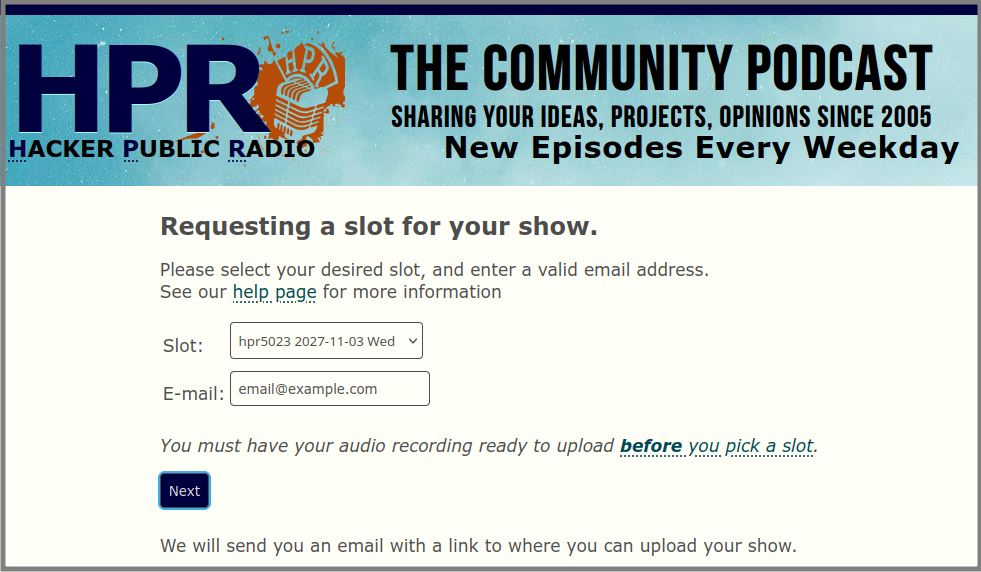
You should then see a thank you page.
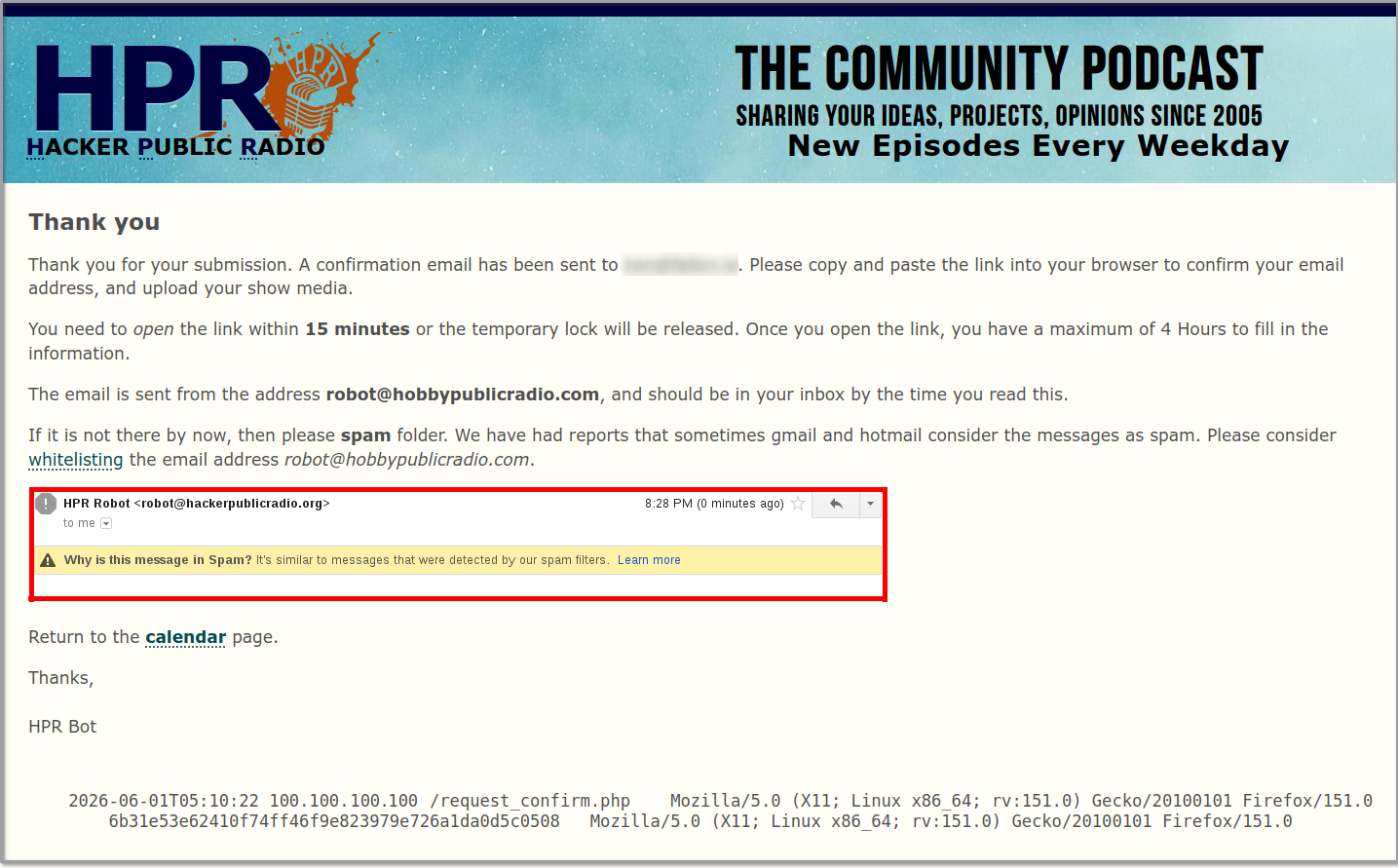
The thank you page, and confirmation email, both contain all the information we collect about you.
We will then send you a unique link which you can use to upload your show.
The Confirmation Email may be marked as spam.
The email should arrive within seconds of you pressing next above.
We have had reports that sometimes gmail and hotmail consider the messages as spam.
If it is not there within five minutes, then please check your spam folder.

Please consider whitelisting
the email address robot@hobbypublicradio.com.
The reservation expires after 15 Minutes.
You have 15 minutes to open this link or your reservation will automatically be deleted so that the slot can become available to another host.
The slot will be released after 4 hours.
Once you open the link, you have a maximum of 4 Hours to post your show.
If you do not do so then the entire reservation will be removed so another host can avail of the slot.
You must upload from the same IP Address.
As a security measure, you must upload your show for the same IP Address as your reservation.
Errors resulting from this may be caused by:
- Making a request on one network (work), and processing it on another (home)
- Your ISP is using NAT, and is assigning a new ip from the pool for the next request
- You are using a VPN, and the IP address changed.
- Your router rebooted and you got a new IP address.
- You switched from 5G to WiFi.
You can only reserve one show at a time.
As a security measure, we do not allow multiple reservations.
Your first show must be posted before you can reserve a slot for your second.
We share what we log.
We log the date you uploaded, from which IP Address you used, and your user agent.
Once your show is processed this information is removed from the database.
You can also delete the reservation.
Click on the link supplied, and select "Delete this reservation ..." at the bottom of the page.
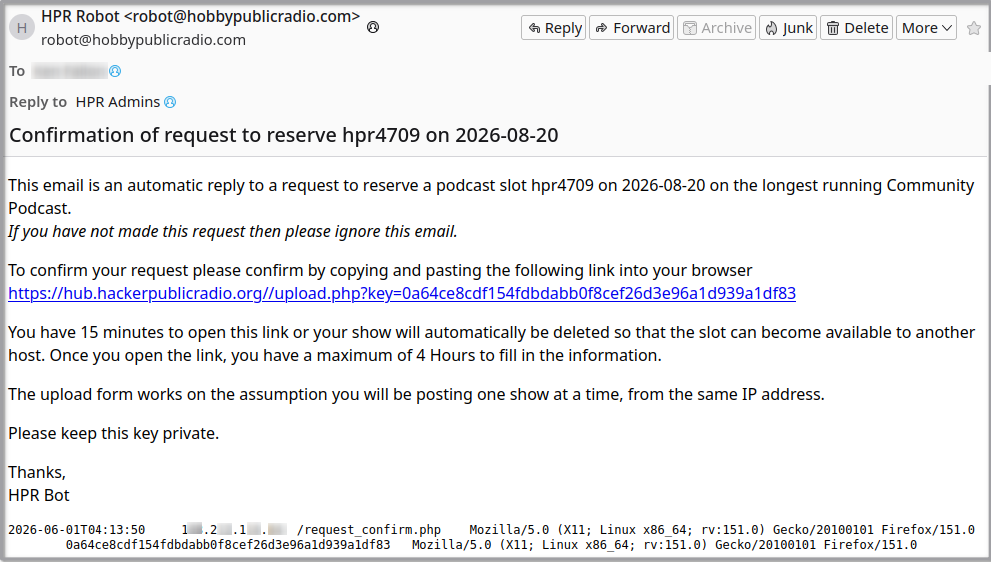
When you click on the link sent by email, you can manage both the episode, and information about yourself that is displayed on HPR.
All information you provide will be displayed publicly.
The only exception is that your email address will be sent
in the feed with some anti-spam additions.
For example hpr@example.com will become hpr.nospam@nospam.example.com
Your profile information is used on the website, in the RSS feeds, and on social media sites.
email: already populated.
Your email is the one provided in the request form earlier.
Please always use the same email for HPR, as otherwise we will consider you a new host.
Contact the Janitors and they will change your email address for you.
Some hosts like to set up an email alias, or add a +hpr after their email name.
Expand the notes above for more information.
image: Your profile picture/avatar.
Optional
If you have a Gravatar image associated with an email address, then we will use that.
Otherwise you can upload a profile image.
Name/Handle: How you wish to be known.
Mandatory
It should be the name you wish to be known as on HPR. It can be your real name, an Internet handle or both.
Contact the Janitors and they will change your Handle for you.
Your Default license: defaults to CC-BY-SA.
This field tells us what your work is normally licensed under.
We recommend you use a Creative Commons Attribution-ShareAlike 4.0 International (CC BY-SA 4.0) license.
That means that while you continue to retain the copyright to your show you are allowing us (and everyone else) to use it; provided we give you attribution
and that we release it under the same license.
We allow the following licenses:
- CC 0 - This is a public domain license.
- CC BY - This license is similar to a MIT/BSD source software license.
- CC BY-SA - This license is similar to a copyleft free and open source software license and is our default license.
- Other - This is for other OSI Approved Licenses.
Profile: Where people can find more information about you.
Optional
Enter some text about yourself with links to your blog or other online presence.
You can use the what you see is what you get/WYSIWYG
editor to format your profile as you would like to see it rendered.
You can change your profile information at any time, by submitting another show.
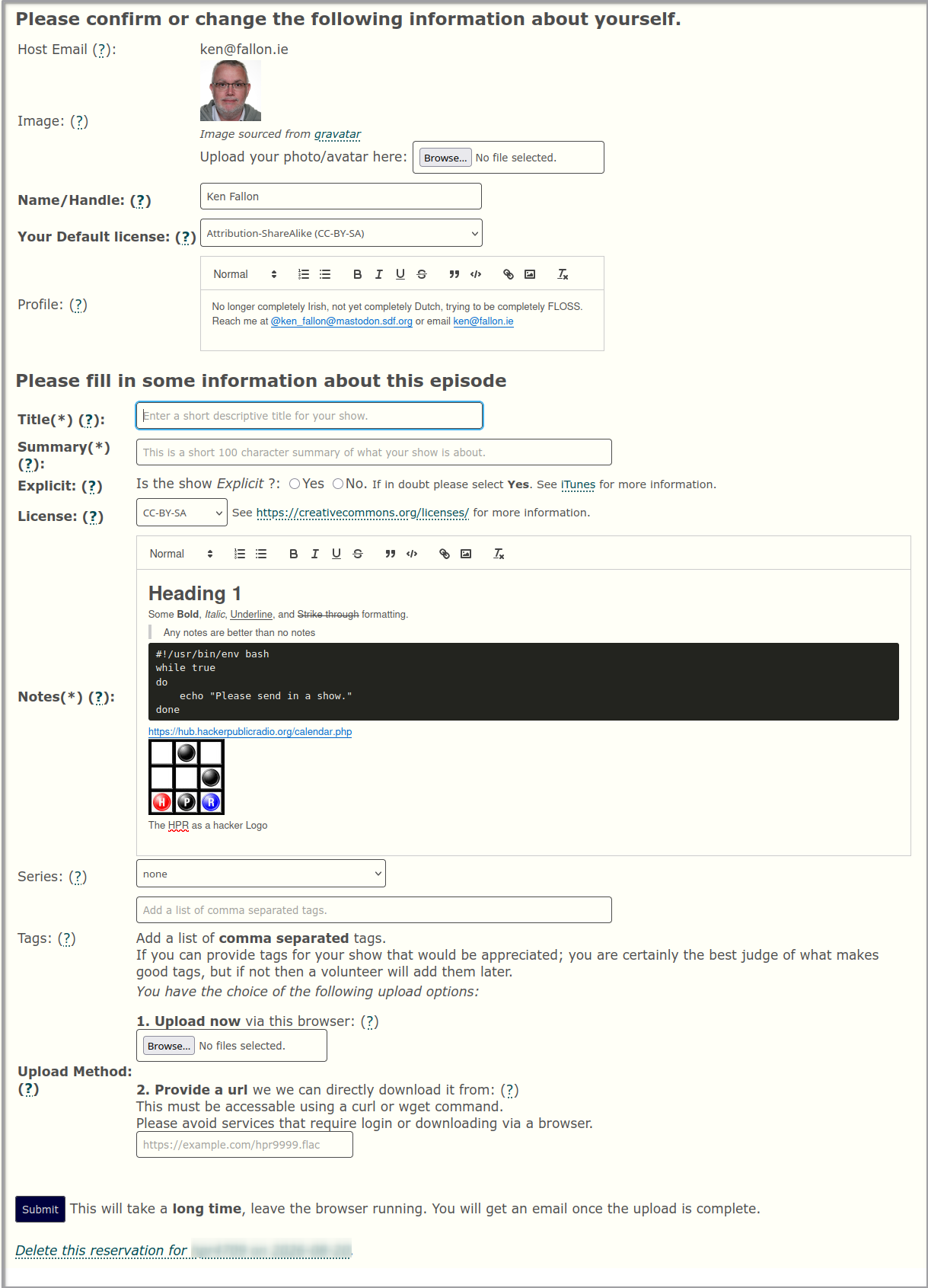
Your show information is used on the website, in the RSS feeds, and on social media sites.
Title: A descriptive title.
Mandatory
This will be a short 100 character descriptive title and will be used everywhere to identify your show.
Any valid utf-8 character is acceptable, but keep the length short and clear.
Summary: A short summary of what your show is about.
Mandatory
This is a short 100 character summary of what your show is about.
Please fill this out as it is used once the show has gone off the main page, on the mobile site,
on printed brochures, on text to speech announcements, on Mastodon etc.
Please refer to yourself in the third person. Instead of "I talk ...", rather use ""Bob talks ...".
Explicit: If your show is Explicit or Clean.
Mandatory
See iTunes for more information.
We flag HPR as Explicit by default but you are free to mark it Clean if you wish.
Expand the note about explicit content above.
License: defaults to CC-BY-SA.
Mandatory
This field tells us what your work is licensed under.
We recommend you use a Creative Commons Attribution-ShareAlike 4.0 International (CC BY-SA 4.0) license.
That means that while you continue to retain the copyright to your show you are allowing us (and everyone else) to use it; provided we give you attribution
and that we release it under the same license.
We allow the following licenses:
- CC 0 - This is a public domain license.
- CC BY - This license is similar to a MIT/BSD source software license.
- CC BY-SA - This license is similar to a copyleft free and open source software license and is our default license.
- Other - This is for other OSI Approved Licenses.
Show Notes: Enter a description about your show, including links to the topics you discussed..
Mandatory
If you allow JavaScript, you can use the what you see is what you get/WYSIWYG editor buttons to add additional formatting.
It supports, Headings, Number and Bullet lists, Bold, Italic, Underline, and Strike through formatting, Code Blocks, Blockquotes, and links.
You can include images as well. We automatically create thumbnails,
so please upload and place the full size images in the notes.
Add the descriptive text under the image.
Optionally - You can paste in Rendered HTML but we will remove any styling.
Do not paste un-rendered markup (HTML, Markdown, RestructuredText) unless your intention is to have un-rendered markup as shownotes.
It is important to provide good show notes because:
- They provide the listeners with more information on the topic.
You have taken the time to record a show on a topic, so many people will want to find out more on the subject,
therefore you should include links to give more information. It is not enough to just give it in the show itself
as people may be listening while away from the Internet, and they may have forgotten or misheard your links.
- You are making more work for the Janitors.
It is always better if you send us show notes yourself as you know best what information you are trying to convey.
If you do not supply show notes then your show notes will need to be edited manually by an HPR volunteer.
As we do not listen to the show when posting, your show will first be added without show notes.
Once it has been published in the Future Feed
we can listen to it and create the show notes.
Once they are done we then need to go back and republish the show to the website.
We also need to edit the Internet Archive page created for your show.
This runs the risk that the podcast platforms will not pick up the change.
- They encourage people to download your show.
We produce a lot of shows and many people download based on the text in the show notes.
If the show notes are not descriptive then it is less likely that
it will get as many downloads as other shows with good show notes.
- They allow your show to be indexed by search engines.
Search engines cannot determine the content of your show from the audio alone.
The only way for your show to be indexed is for you to describe in the associated text what you say in the audio.
- They make your show accessible to the deaf and hard of hearing.
Your audio is completely inaccessible to those who have hearing problems,
It helps them if you distill the essence of the show into the show notes.
If you are using a script to prepare your show then include that.
Series: Select a series from the drop down.
Optional
See if your show fits into a series.
Tags: Add a list of comma separated tags.
Mandatory
Pick the most important words from the show notes.
Your tags are added as #hashtags on social media.
This helps people find your show by topic keyword on our
tags page.
Upload Method: How you are going to send us your audio.
Mandatory
- Upload now via this browser
You can upload single or multiple files using this method.
Chrome will display the percentage uploaded, but in Firefox you will need to just wait.
- Provide a url for us to get it from
Using this option may cause delays as a HPR volunteer will need to troubleshoot any issues that may occur,
and this can result in your show not been posted on time.
This must be publicly accessable using a curl or wget command.
Please avoid services that require login or downloading via a browser.
If you want to submit an additional file with your show, then put them in a zip, or tgz file.
Link to them using just the file name "example_output.pdf" without any paths.
Do not add any additional images this way, just include them in the show notes.
If you provide a subtitle, transcript with your upload we will automatically use that.
whisper --language en --output_format srt myshow.flac
Will produce a srt file with the same name as your audio.
You can then edit the text but leave the timing in place.
$ ls myshow.*
myshow.flac myshow.srt
During the upload hold the Ctrl key and click on both files.
You should see Two Files Selected next to the Browse button.
The slots will only be allocated once the shows have been successfully processed.
Any missing information can result in a show missing the requested slot.
Press submit and your show will be sent to the HPR Volunteers to be processed.
Keep an eye on the calendar for when it is posted.
For more information on the process of Uploading a show
and Show Processing can be found on our GitTea repo.